


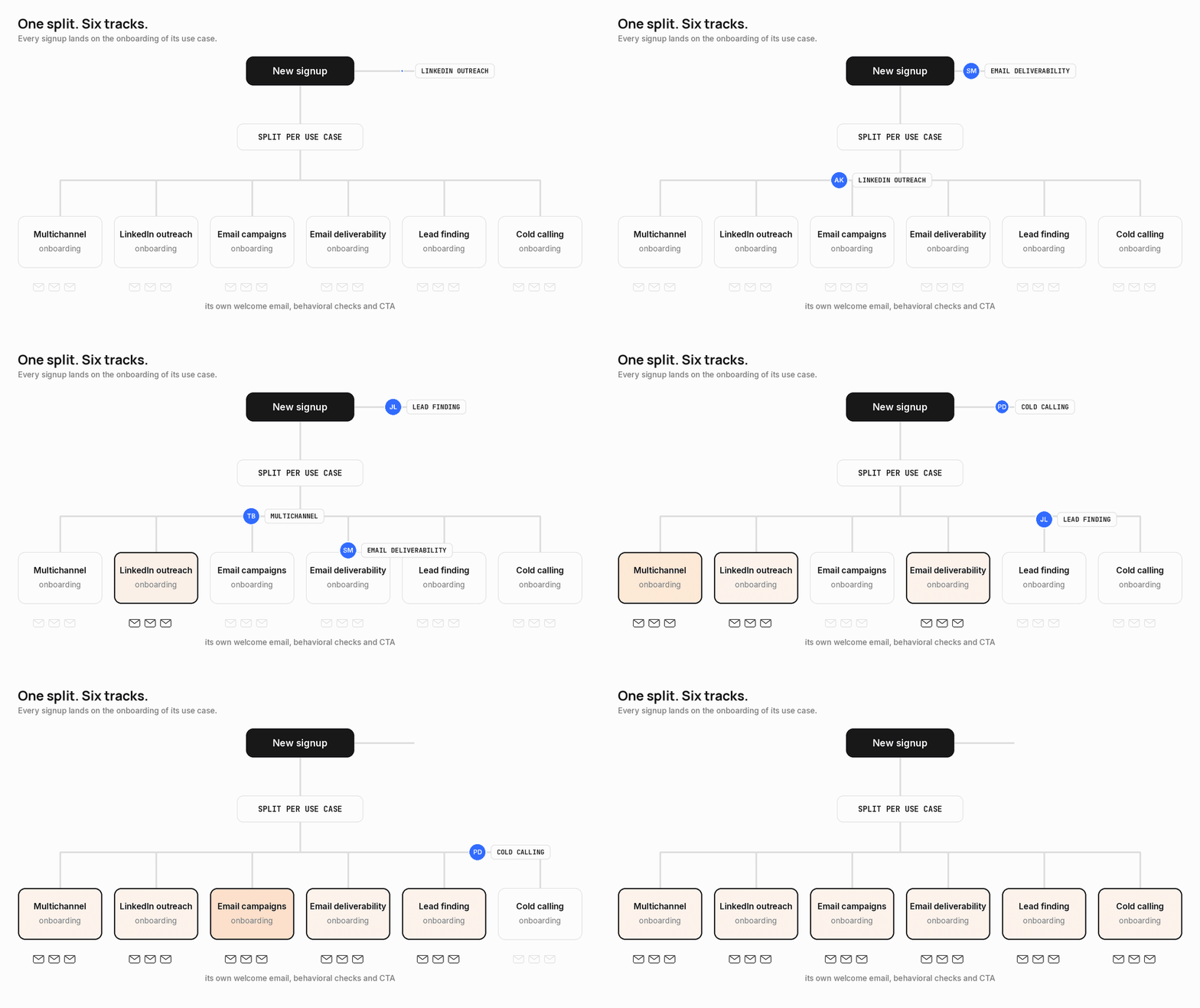
Last edition was the architecture.
Six use case tracks, two gates before the first send, enrichment running in parallel, behavior-based instead of calendar-based.
This one is the part nobody screenshots.
I’ll focus on the pro email track, the business domains. That’s where the revenue is, and where almost all the dynamic logic lives.
Who signs the email, what it says, where the button sends you. All of it changes per user.
And since launch, free trial to paid went from 11% to 14.5% over 2 consecutive months.
Better activation, not more pressure. Here’s how it holds together.
One flow, everything dynamic
Two users sign up with a business email the same minute:
One is an SDR who came for LinkedIn outreach.
The other is a Head of Sales who came for deliverability.
They enter the same flow. They will never read the same email.
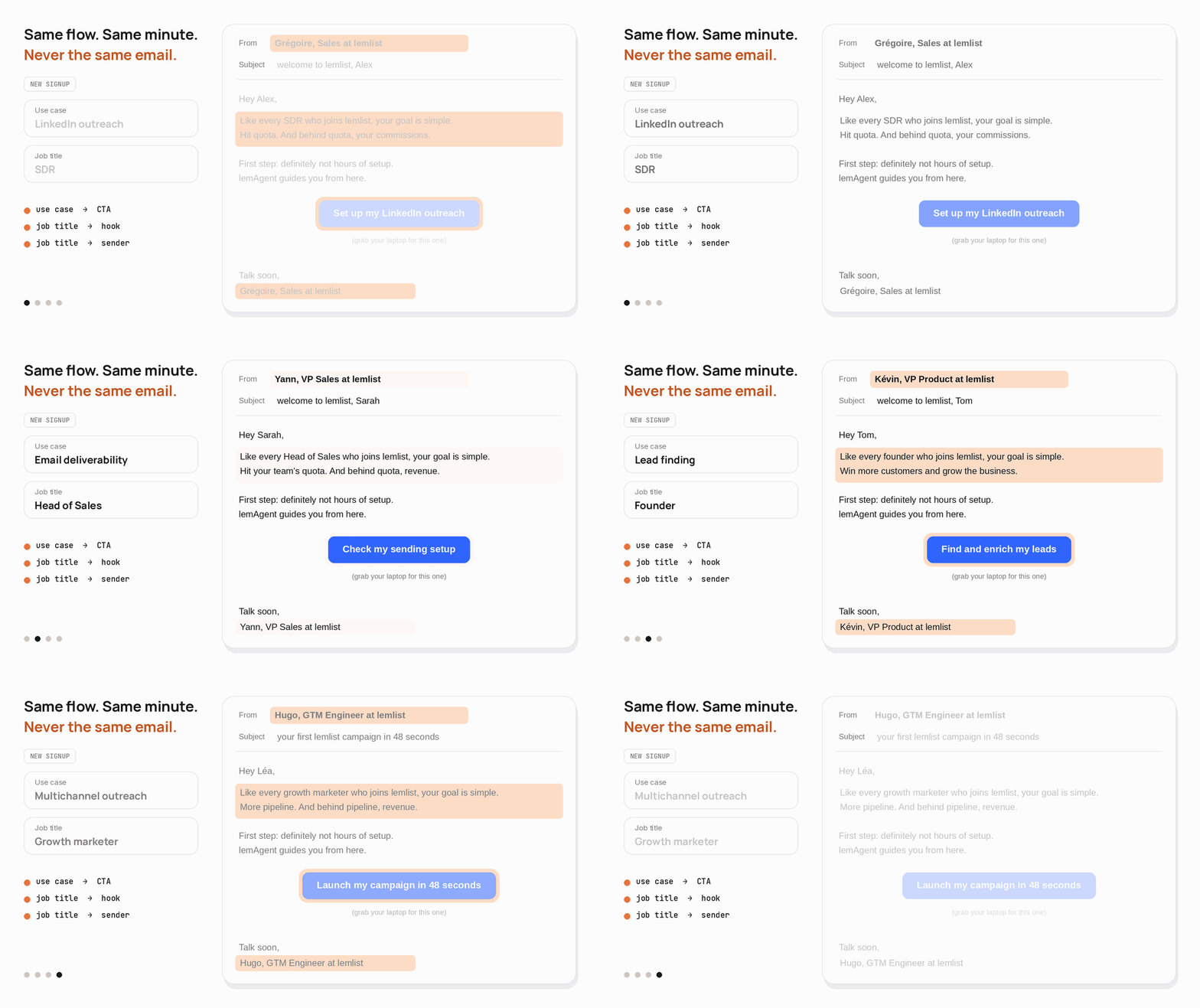
Three layers change for every user.
The use case decides the content and the CTA.
The job title decides the hook.
The job title also decides who sends it.
The use case picks the CTA
Every welcome email has one button. It never opens the dashboard. It opens lemAgent with a prompt already written for that use case.
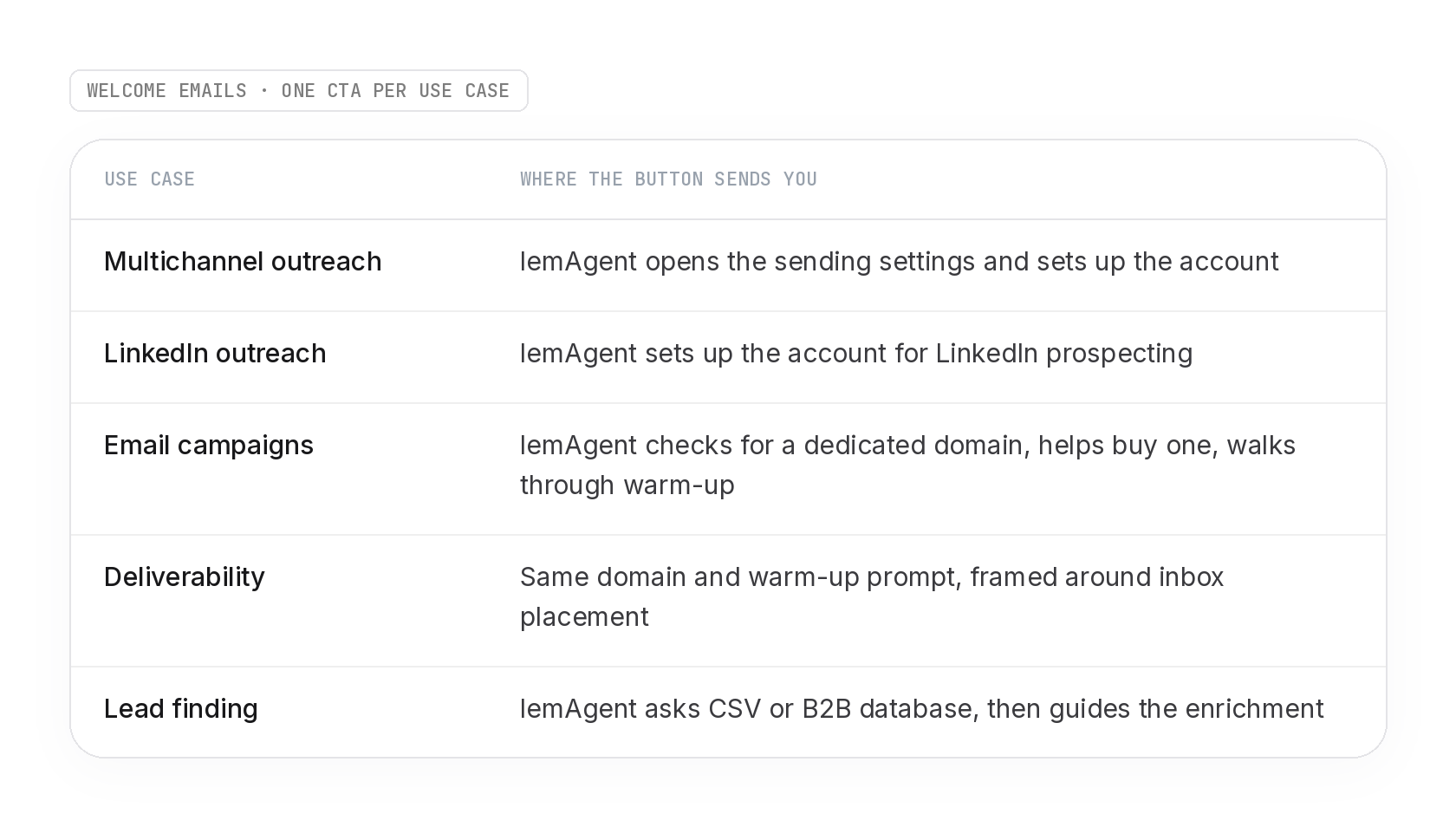
The user doesn’t land on a blank screen wondering where to start. They land mid-conversation in the product, on the exact task they signed up for.
The job title picks the hook
Inside each email, one sentence changes per persona with a Liquid case.
An SDR reads about hitting quota, and behind quota, commissions.
A founder reads about more customers.
A Head of Sales reads about team quota and revenue.
An agency reads about meetings for clients and their ROI.
Same email, same structure, six different reasons to care. Plus a fallback for anyone who skipped the question.
The job title picks the sender
One action in the flow sets two attributes per user, the sender address and the signature. Every email after it uses them.
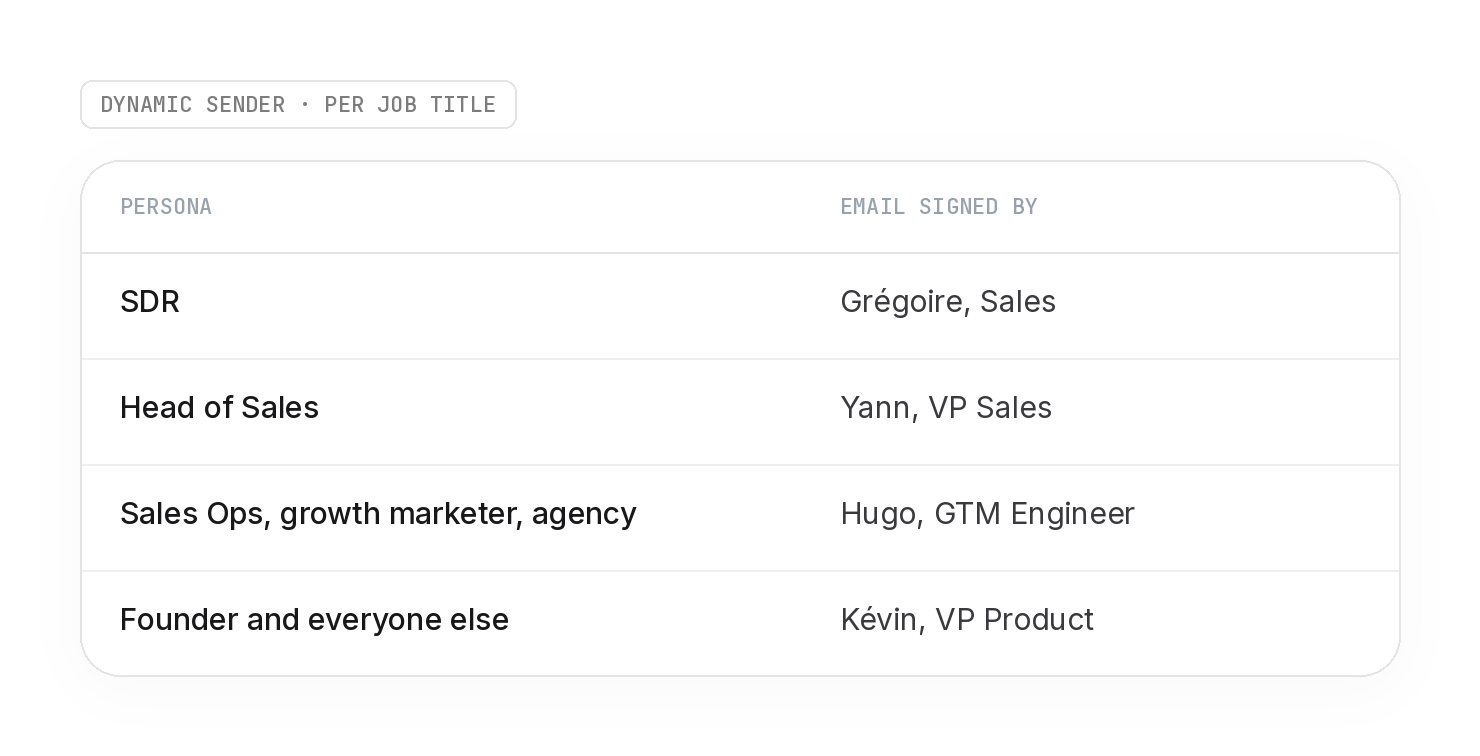
An SDR gets emails from a sales peer.
A Head of Sales gets emails from a VP Sales.
A GTM engineer talks to the ops and growth people.
People reply to people who look like them. And replies land in a real inbox, read by the person whose name is on it.
4 languages without losing our minds
👉 English, French, Spanish, German. Every email exists in all four.
The naive way is to duplicate the flow per language.
→ Four flows, four sets of branches, four places to fix the same bug.
We did the opposite. One flow. The language split happens in each email.
Everything upstream (use case routing, behavioral checks, demo logic) is written once.
Only the message itself forks.
The rule we follow when translating is simple. Translate the intent, not the words.
A French founder doesn’t read “magic meeting machine” the same way an American SDR does.
So each version is rewritten to sound native, conversational, never corporate. lemlist and lemAgent stay as they are.
The part people forget is the CTA.
Our buttons open lemAgent with a pre-filled prompt in the URL.
If you translate the button but not the prompt, a German user clicks “Kampagne starten” and lands on an English prompt.
So button text and URL prompt get translated together, every time, and the prompt is URL-encoded per language.
Same for the persona hooks. The Liquid block is translated as a whole, not word by word. “Hit quota, and behind quota, commissions” doesn’t translate literally.
Email and in-app, one conversation
Most teams run lifecycle email in one tool and in-app in another. We don’t, we have all in the same flow.
→ Result: a user gets an email about the B2B database on Tuesday, and an in-app tour about LinkedIn on Wednesday. Each message makes sense alone. Together they feel random.
We fixed it by making Customer.io the brain and Intercom the arm.
The flow fires webhooks into Intercom at the exact moments the email logic decides something. 11 distinct Intercom webhooks, placed 64 times across the tracks.
The logic is always the same. The email explains why. The in-app shows where.
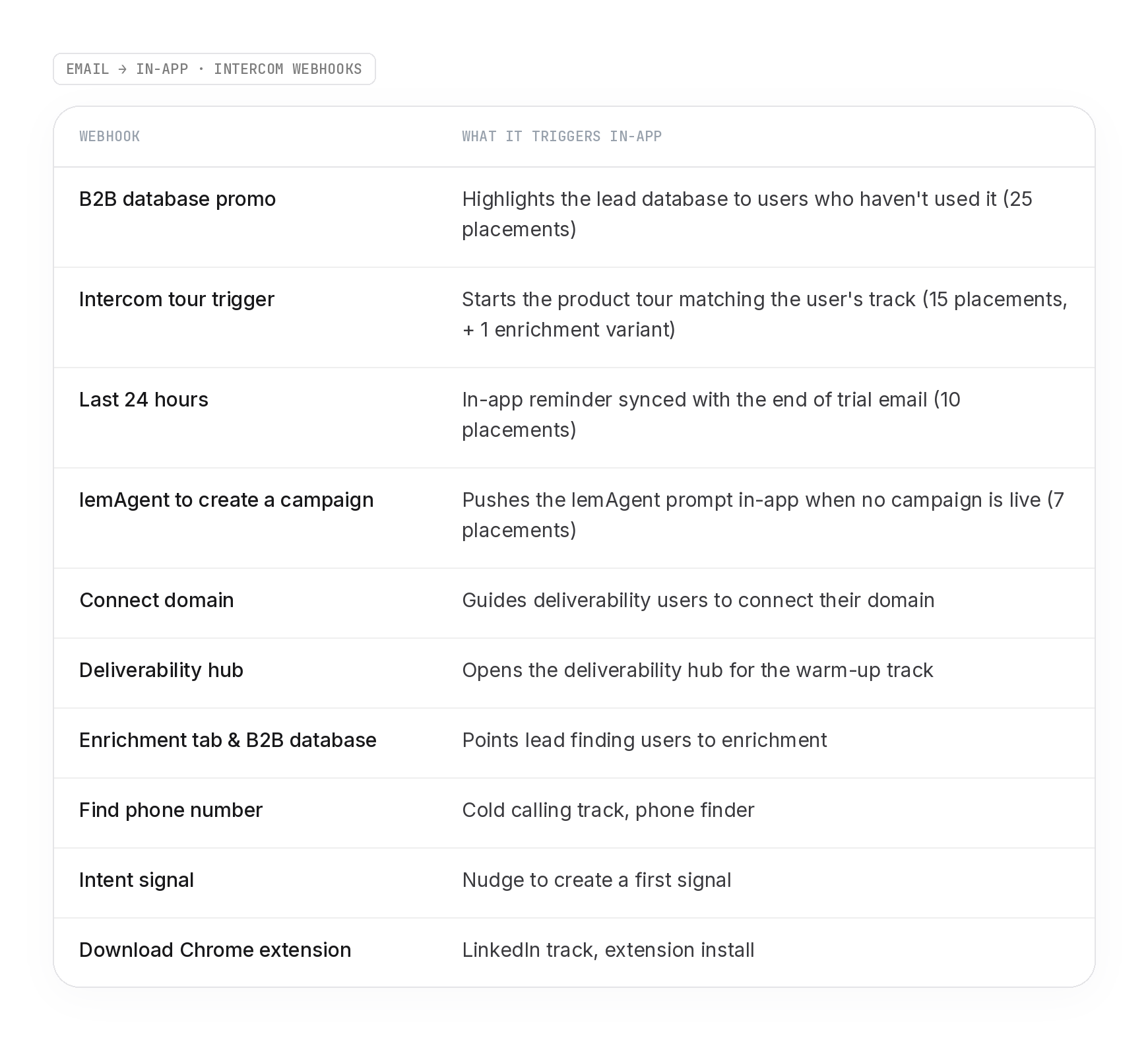
When the trial hits its last 24 hours, the same message waits in the product. Same deadline, same next step. No contradiction between channels.
One brain decides. Every channel executes.
The full email library
822 actions sounds like hundreds of emails. It’s not.
There are 22 unique emails. They’re placed 115 times across the tracks, and each placement exists in 4 languages. That’s where the 460 comes from.
The library is small on purpose. One email, reused everywhere it makes sense, beats ten variations nobody maintains.
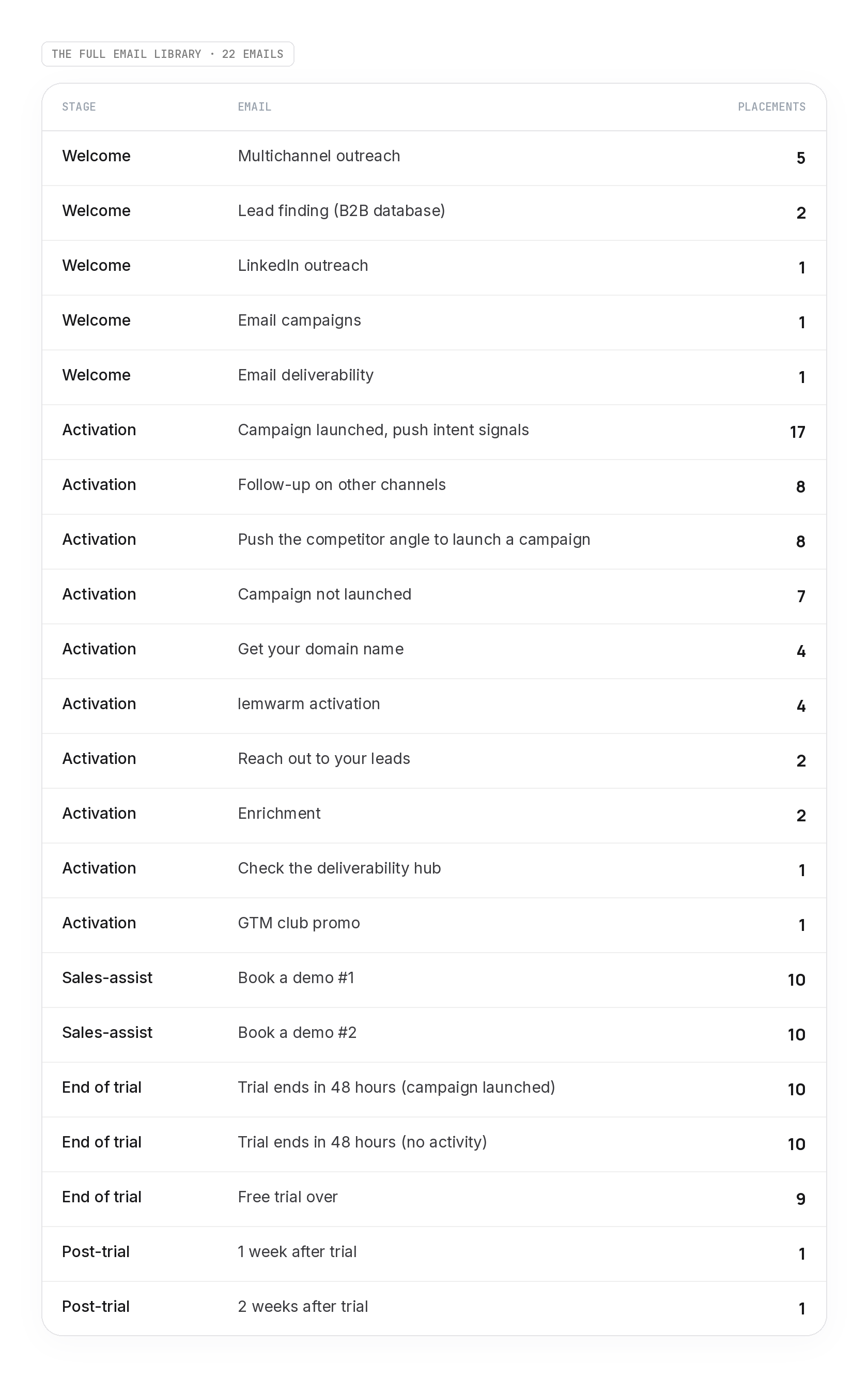
Two things stand out.
Welcome emails are the most specialized and the least reused. That’s the use case routing from edition 1 doing its job. The first touch is the one that has to match intent.
The further down the flow, the more emails get shared. By the end of trial, the only split that matters is “did they launch something or not.” The use case has done its work by then.
The demo email for invited users
There’s one user the main flow wasn’t built for. The person who didn’t sign up on their own.
Here the context: a manager starts a trial, invites three reps, and those reps land in lemlist without choosing it.
No use case picked. No reason to explore. Just a tool someone else told them to use.
Sending them a welcome email about “your goals” makes no sense. They don’t have goals in lemlist yet. Their manager does.
So they get their own small flow, 22 actions, built on the same blocks as the main one.
Same gates. Deliverable email, pro domain, and a wait until the email is confirmed (max 2 days).
Same sender logic. The job title picks who signs.
Two emails, 5 days apart, in 4 languages.
Exit as soon as a demo is booked.
The email itself is short. The subject: “Saw you just joined your team on lemlist.”
The body says what’s true.
The first few days decide whether someone gets results or quietly stops logging in.
Then it offers 20 minutes to review their setup and share what works for people joining an existing lemlist team.
Two details make it feel a bit more 1:1:
It only sends on weekdays, between 8:15 and 17:00. A rep doesn’t email you on Sunday night.
And a random delay of up to 40 minutes sits before it.
This is where multithreading starts. One trial, one champion, then the people around them. Each one gets a human-looking reason to talk to us.
The hacks I promised
None of these need a new tool. Most take ten minutes to set up.
1. Lowercase subject lines. “your first lemlist campaign in 48 seconds.”
No capital, no emoji, no brackets. Marketing emails capitalize. People typing to a colleague don’t. In a crowded inbox, looking like a person is the whole game.
2. Never send “Hey ,” If the first name is missing at signup, one action sets a fallback before any email goes out.
Every variable in every template also carries a default. Nothing kills the 1:1 illusion faster than an empty merge tag.
3. A template for product emails, none for demo emails.
Welcome, activation and end of trial emails use our email template. The book a demo emails don’t. No design, no header, just text and a link. A rep doesn’t write in a newsletter layout, so neither should an email signed by a rep.
4. Wait for the email confirmation.
The first email doesn’t go out at signup. It waits until the user confirms their email (SSO or link click), for up to 2 days. Users who confirmed are users who are paying attention. And you stop sending to people who gave a fake address. (+ you protect your deliverability).
5. Deep-link the CTA into the product, pre-filled.
The button doesn’t open the dashboard. It opens lemAgent with a prompt already typed. The user lands one click away from the action instead of five.
6. Tell mobile readers to come back.
Under the main button: “(grab your laptop for this one).” A lot of people open on their phone. Setting up a campaign on mobile is painful. Saying it out loud turns a lost click into a deferred one.
7. Pre-fill the demo form. The “Book a demo” link passes first name, last name, email, team size and language into the contact form URL. The user lands on a form already filled. One click to book.
8. Make sales-assist emails sound like a rep.
“I saw you’re leading the lemlist rollout for your team.” Short, no button, a text link, a reply-to that reaches a human. And a line most marketers never write: “this isn’t a sales call.”
9. A random delay before some sends.
A 1 to 3 minute random delay sits in the flow.
10. Track human opens, not opens.
Over the last 45 days on the pro track, total open rate was 43.5%. Human open rate was 30.9%. Almost 3 opens out of 10 were machine prefetch. If you optimize subject lines on the total number, you’re optimizing for Apple’s privacy proxy.
What this level of complexity costs
Here’s the honest version.
This flow is never done. The product ships something (signals, lemAgent, new credit plans) and the flow has to follow. Since edition 1, it went from 718 to 822 actions. Not because we planned it.
More actions means more places where something can break without anyone noticing. A translated button with an English link behind it. A webhook that stops firing. A fallback that never triggers. None of them throw an error.
That’s the real cost of complexity. Not building it. Checking it.
What the last 45 days look like on the pro track during the trial (business emails only):
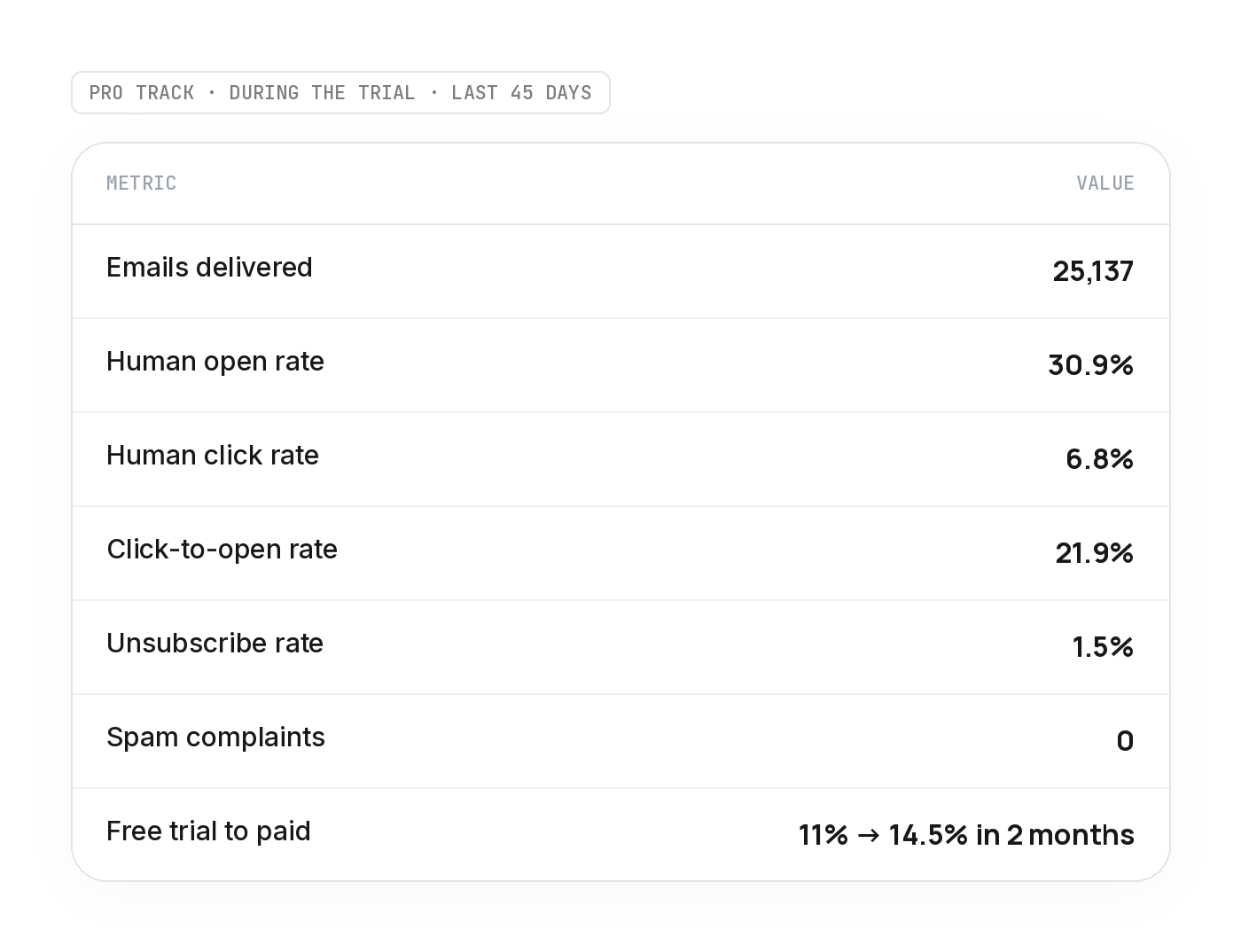
Zero spam complaints on 25,000 emails. That’s what the email verification gate and the confirmation wait buy you.
What makes it manageable:
Name every action. “Have launched a camp with more than 5 leads?” is ugly, but you find it in two seconds among 822 steps.
Reuse emails instead of cloning them. 22 emails to maintain, not 115.
Use the Customer.io MCP to audit the flow. Counting actions, listing webhooks, pulling the email library for this edition took minutes, not an afternoon of clicking.
Alert on webhook failure rate, not only on email metrics.
Audit every language version after a big change, not only when the numbers drop.
Boring wins
A generic flow is easy to maintain because it does nothing.
This one does a lot. It speaks 4 languages, talks to the product, and decides every next step based on what the user did.
If you take one thing from these two editions, take this.
→ Route on intent and let behavior pick the next email, and keep the library small enough that you can still read it.