


B2B SaaS products convert somewhere between 8% and 18% of their freetrials.
That means 80-90% of the people who sign up never pay.
The default explanation is “the product didn’t click” or “they weren’t a good fit.”
And sometimes that’s true. But after running lemlist’s free trial flow for years, I started noticing something else.
The problem wasn’t that users didn’t get value.
It’s that we were showing them the wrong value for a lot of them.
At lemlist, some signs up to warm up their email domain. But we send them a welcome email about multichannel outreach.
Someone signs up to find leads in our B2B database. But we send them a tutorial about building email sequences.
Same flow. Same emails. Same timing. We were focusing on the user profile during the signup. Not on the job to be done for each of them.
And that’s exactly why most free trial flows underperform or at least leaves money on the table.

The real problem: a correct routing.
Let me explain what I mean by:
Freetrial conversion isn’t an email problem. It’s a routing problem.
When someone signs up for lemlist, they could be here for six completely different reasons:
Multichannel outreach (email + LinkedIn + calls)
LinkedIn prospecting only
Pure email campaigns
Email deliverability and warm-up
B2B lead database and enrichment
Cold calling
These aren’t slight variations. These are fundamentally different products inside the same platform.
A user focused on deliverability doesn’t care about your LinkedIn integration. A user exploring your B2B database doesn’t need a tutorial on campaign sequences. Not yet, at least.
The generic flow ignores all of this.
It talks in broad terms because it has to serve everyone and push to activate on the most common use case that we decided on our side.
Use case as the first question, not an afterthought
So we made a decision that changed the entire architecture.
Instead of branching users later in the flow based on behavior, we branched them at the very beginning based on their stated use case during onboarding.
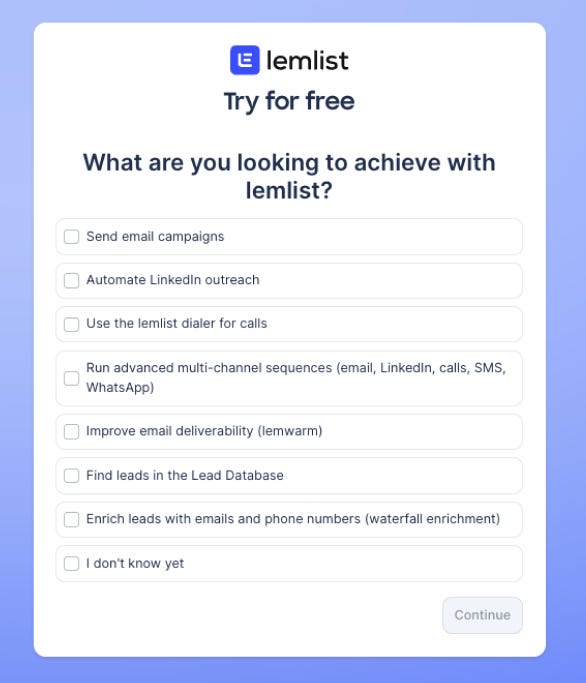
One multi-split branch. Six parallel tracks. One catch-all for users we couldn’t classify.
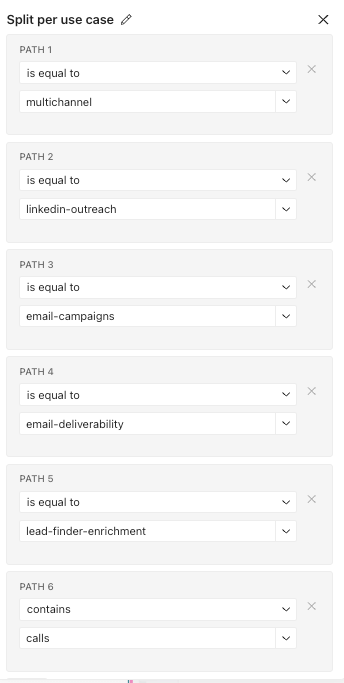
Every track gets its own welcome email. Its own behavioral checks. Its own CTA logic. Its own feature highlights.
From the system’s perspective, a multichannel SDR and a solo founder testing lead enrichment are two completely different users going through two completely different products.
That single decision cascaded into everything else.
Why use case and not something else?
We considered other branching variables. Company size. Acquisition source. Industry.
None of them predicted what the user actually wanted to do inside the product.
A user from a Google ad and a user from a referral exploring the B2B database need the same first email.
The use case is the closest proxy to intent.
Everything else is demographics and demographics tell you who someone is.
Use case tells you what they came to do.
Before anything sends, two gates have to open
Here’s where most teams skip straight to the welcome email.
We don’t.
Before a single message goes out, two things happen.
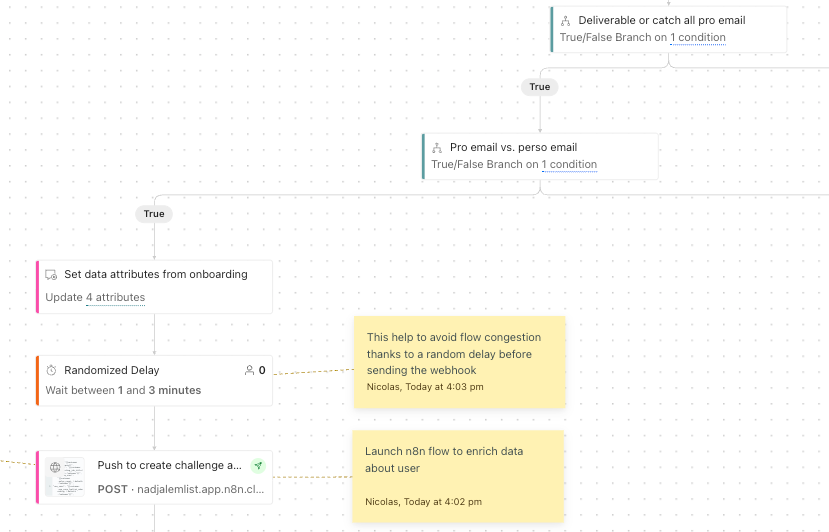
First, a webhook fires to verify the email address in real time. Not a batch check. Not a weekly cleanup. The moment someone signs up, we verify deliverability.
Why? Because sending to unverifiable addresses burns your sender reputation.
And sender reputation is cumulative. One bad cohort can drag down deliverability for the next three months.
Second, we split professional emails from personal ones.
Gmail, Outlook, Yahoo on one side. Business domains on the other.
This isn’t a quality judgment. It’s a business decision.
We looked at the data. Personal emails represent a real share of signups. But when we checked what percentage of actual revenue comes from personal email users, the number told a different story.
That ratio changes how much you invest in each track.
If 40% of your signups are personal emails but they generate 5% of your revenue, you don’t give them the same treatment as pro emails. You still onboard them. But you size the effort to the opportunity.
The enrichment problem at 12,000 free trials
Here’s a constraint most lifecycle content doesn’t talk about.
Volume.
When you’re processing around 12,000 free trials/mo, you can’t rely on manual enrichment.
But you also can’t afford to wait for enrichment before starting the flow.
So we built a parallel system.
The Customer.io flow starts immediately. The user gets their gate checks, their use case routing, their first email.
Meanwhile, an n8n flow runs in parallel to enrich the company data. Firmographics, company size, industry, tech stack. Whatever we can grab.
The enrichment doesn’t block the flow.
It feeds into it.
By the time the user hits the second or third touchpoint, we have a much richer profile to work with.
The behavioral checks downstream can use both what the user did inside the product and what we know about their company.
Two systems. Running in parallel. Feeding the same profile.

Liquid syntax over AI. Here’s why.
There’s a temptation right now to throw AI at every personalization problem.
We went the other direction.
Most of the dynamic content in our emails uses Liquid syntax. Only 20% of the flow use AI.
Conditional blocks. Variable insertion. If/else logic based on profile attributes.
Why not AI-generated copy for all?
Three reasons.
Predictability. Liquid gives you the exact same output for the same input, every time. You can predict what 12,000 users will see without running 12,000 test sends.
Cost. At our volume, AI-generated content per email adds up fast. Liquid costs nothing at render time.
Control. When something breaks in a Liquid template, you can find the bug in the template.
When something breaks in AI-generated content, good luck figuring out which prompt, which variable, which edge case caused the issue.
AI has its place. But for predictable, high-volume lifecycle flows, Liquid is the more boring and more reliable choice. Use it when you can.
Boring is underrated when you’re sending to 12,000 people.
Behavior decides the next email. Not the calendar.
Traditional flows send on a fixed schedule. Day 1, day 3, day 7, day 14.
The problem is obvious once you say it out loud.
A user who launched a campaign on day 1 and a user who hasn’t logged in since signup are in completely different situations on day 3.
So we replaced the fixed calendar with behavioral checks.
Did they launch a campaign with at least 5 leads?
Did they launch any campaign at all?
Did they create an intent signal?
Did they buy a sending domain?
Did they connect a CRM?
Did a demo request go unanswered?
Each check gates what happens next.
Active users get pushed toward advanced features. Inactive users get nudged toward the basic action they haven’t completed related to their original use case.
The delays between steps still exist. But they’re contextual.
The flow reads less like a drip sequence and more like a decision tree that happens to send emails.
The merge nobody talks about:
Product-led meets sales-assist (aka book demo from PLG).
Most companies run two separate systems. (we did it too)
The product-led flow lives in Customer.io or Intercom or whatever lifecycle tool they use.
The sales-assist flow lives in the CRM. Maybe Salesforce. Maybe HubSpot.
The two don’t talk to each other.
We merged them.
Inside the same flow, when a user matches certain criteria, the system triggers demo booking emails. But not generic “book a demo” CTAs with a Calendly link sitting in the sidebar.
These look and feel like 1:1 emails from a real person on the team.
Same tone. Same formatting. Same reply-to address.
The user can’t tell whether it’s an automated lifecycle email or a personal outreach from a sales rep.
That’s intentional.
Because the moment a demo email looks like marketing, it performs like marketing. Low engagement. Low booking rates. Easy to ignore.
When it looks like a human reached out because they noticed something specific, the dynamic changes completely.
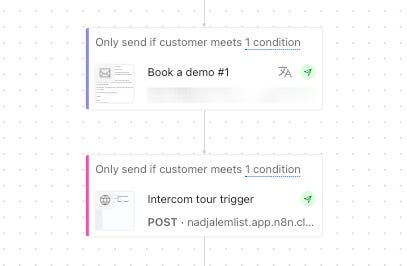
What this actually looks like in practice
The whole system, when you zoom out, works like this:
User signs up.
Email gets verified.
Pro or personal email gets classified.
Use case gets captured.
User enters one of six tracks.
n8n enriches the company data in parallel.
The first email matches their exact use case.
Behavioral checks run continuously.
The next email depends on what they did, not when they signed up.
If they qualify for sales-assist, a 1:1 demo email fires inside the same flow.
Liquid syntax handles the dynamic content.
Everything is predictable, debuggable, and runs at 12,000 users without breaking.

The uncomfortable part
This is not a simple system.
The final flow has +718 actions. Six parallel tracks. Behavioral checks at every stage. Language variants for every email. Webhooks firing into multiple systems.
Building it took significantly longer than the generic flow it replaced.
Maintaining it is harder too (still the Customer.io MPC helps a lot!)
But a generic flow is easy to maintain for one reason. It's not doing much.
Easy to maintain and low-performing aren’t virtues.
They’re just comfortable.

Next edition, I’ll get into the execution layer.
How we handle 4 language variants without losing our minds, the 14 Intercom webhooks that sync email with in-app experience, the full email library, and what this level of complexity actually costs to maintain.
And of course I’ll share some very cool hacks that would probably impact your open and click rate from lifecycle flows 😁